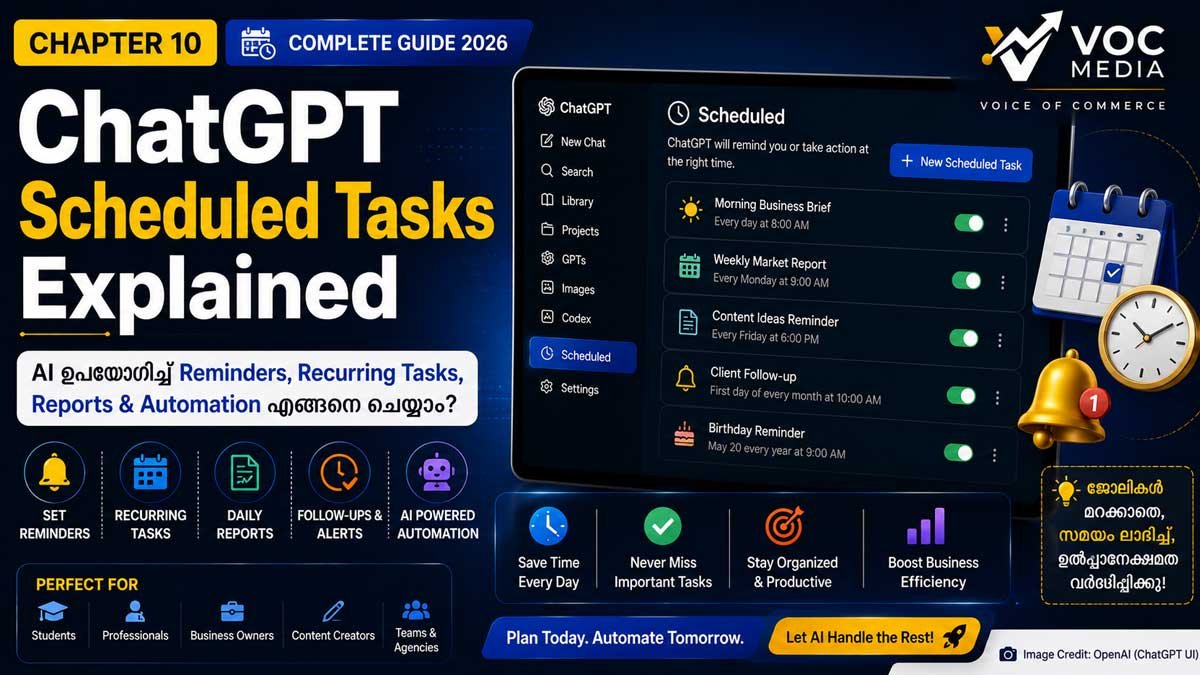
ChatGPT Scheduled Tasks ഉപയോഗിച്ച് ഭാവിയിൽ ചെയ്യേണ്ട ജോലികൾ, ഓർമ്മപ്പെടുത്തലുകൾ, ആവർത്തിക്കുന്ന റിപ്പോർട്ടുകൾ, Follow-up പ്രവർത്തനങ്ങൾ എന്നിവ മുൻകൂട്ടി ക്രമീകരിക്കാം. ഇതിലൂടെ വ്യക്തിഗതവും ബിസിനസ് ആവശ്യങ്ങൾക്കുമായുള്ള AI Automation കൂടുതൽ എളുപ്പമാക്കാൻ കഴിയും.
ChatGPT Complete Guide 2026:Chapter .10
AI ഇന്ന് ചോദ്യങ്ങൾക്ക് മറുപടി നൽകുന്ന ഒരു സംവിധാനത്തിൽ മാത്രം ഒതുങ്ങുന്നില്ല. ഭാവിയിൽ ചെയ്യേണ്ട ജോലികൾ ഓർമ്മിപ്പിക്കാനും, ദിവസേന ആവർത്തിക്കുന്ന പ്രവർത്തനങ്ങൾ ക്രമീകരിക്കാനും, ഒരു നിശ്ചിത സമയത്ത് റിപ്പോർട്ടുകൾ തയ്യാറാക്കാനും AI ഉപയോഗിക്കാൻ കഴിയുന്ന കാലഘട്ടമാണ് ഇന്ന്.
ChatGPT-യിലെ Scheduled Tasks ഫീച്ചർ ഇതിന് സഹായിക്കുന്ന പ്രധാന സംവിധാനമാണ്. "നാളെ രാവിലെ 9 മണിക്ക് ഓർമ്മിപ്പിക്കൂ", "ഓരോ തിങ്കളാഴ്ചയും മാർക്കറ്റ് റിപ്പോർട്ട് തയ്യാറാക്കൂ", "ഒരു മാസം കഴിഞ്ഞ് Follow-up ഓർമ്മിപ്പിക്കൂ" എന്നിങ്ങനെയുള്ള ജോലികൾ മുൻകൂട്ടി ക്രമീകരിക്കാൻ ഇത് സഹായിക്കുന്നു.
വിദ്യാർത്ഥികൾക്കും, Content Creators-ക്കും, Business Owners-ക്കും, Marketing Teams-ക്കും, Freelancers-ക്കും Scheduled Tasks സമയം ലാഭിക്കാനും ജോലികൾ മറക്കാതിരിക്കാനും സഹായിക്കുന്ന ശക്തമായ Productivity Tool ആണ്.

Quick Facts
| വിഷയം | വിവരങ്ങൾ |
|---|---|
| Feature | Scheduled Tasks |
| Platform | Web, Android, iPhone (ലഭ്യതമാറാം) |
| Developer | OpenAI |
| Best For | Productivity & Automation |
| Difficulty | Beginner |
| Reading Time | 8–10 Minutes |
Scheduled Tasks എന്താണ്?
Scheduled Tasks എന്നത് ഒരു നിർദ്ദിഷ്ട സമയത്തോ, ഒരു ആവർത്തിക്കുന്ന സമയക്രമത്തിലോ ChatGPT പ്രവർത്തിക്കേണ്ട ജോലികൾ മുൻകൂട്ടി ക്രമീകരിക്കാൻ സഹായിക്കുന്ന ഫീച്ചറാണ്.
Scheduled Tasks ഉപയോഗിച്ച് എന്തൊക്കെ ചെയ്യാം?
Reminders
Daily Reports
Weekly Summaries
Monthly Follow-ups
Meeting Reminders
Birthday Reminders
Learning Schedule
Project Follow-up
Task Automation
Business Alerts
എവിടെയാണ് Scheduled കാണുക?
Desktop
Sidebar → Scheduled
Mobile
അക്കൗണ്ടും പ്ലാനും അനുസരിച്ച് ലഭ്യത വ്യത്യാസപ്പെടാം.

Scheduled Task എങ്ങനെ സൃഷ്ടിക്കാം?
Step 1
ChatGPT തുറക്കുക.
Step 2
Scheduled അല്ലെങ്കിൽ Reminder ഓപ്ഷൻ തിരഞ്ഞെടുക്കുക.
Step 3
Task എഴുതുക.

Step 4
സമയം അല്ലെങ്കിൽ ആവർത്തനക്രമം (Daily / Weekly / Monthly) തിരഞ്ഞെടുക്കുക.
Step 5
Save ചെയ്യുക.
Scheduled Tasks ഉപയോഗിക്കുന്നതിന്റെ ഗുണങ്ങൾ
ജോലികൾ മറക്കില്ല.
Productivity വർധിക്കും.
Routine Automation.
Follow-up എളുപ്പമാകും.
Planning മെച്ചപ്പെടും.
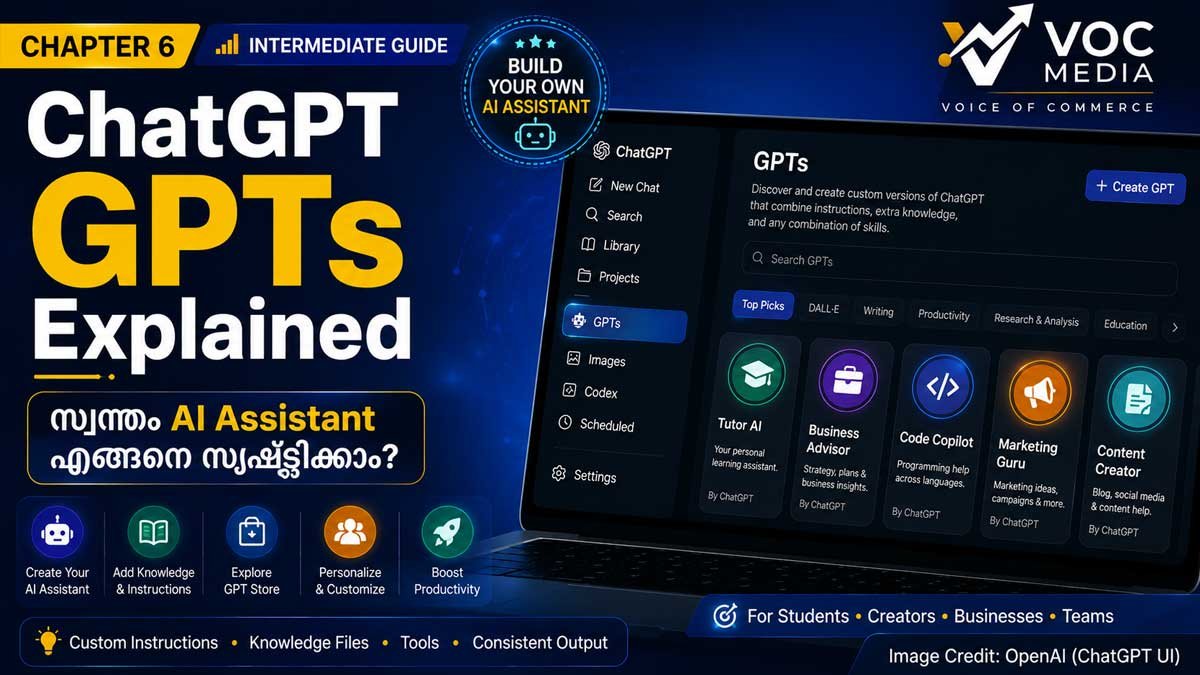
ആരൊക്കെ ഉപയോഗിക്കണം?
Business Owners
Students
Teachers
Journalists
Marketing Teams
Freelancers
Startup Founders
HR Teams
Business Use Cases
Morning Business Brief Reminder
Weekly Editorial Planning
Content Calendar Follow-up
Marketing Agency
Client Campaign Reviews
Monthly Reports
Startup
Investor Meeting Reminder
Product Launch Timeline
Student
Exam Preparation Schedule
Assignment Reminder
Limitations
ലഭ്യത പ്ലാനും അക്കൗണ്ടും അനുസരിച്ച് മാറാം.
എല്ലാ തരത്തിലുള്ള automation-കളും പിന്തുണയ്ക്കണമെന്നില്ല.
Notification ക്രമീകരണങ്ങൾ ഉപകരണത്തെ ആശ്രയിച്ചിരിക്കും.
Best Practices
✅ വ്യക്തമായ Task Name നൽകുക.
✅ ശരിയായ തീയതിയും സമയവും തിരഞ്ഞെടുക്കുക.
✅ ആവർത്തിക്കുന്ന ജോലികൾക്ക് Recurring Schedule ഉപയോഗിക്കുക.
✅ ആവശ്യമില്ലാത്ത Tasks നീക്കം ചെയ്യുക.
Common Mistakes
വ്യക്തതയില്ലാത്ത Reminder.
തെറ്റായ Time Zone.
Recurring Task ആവശ്യമുള്ളപ്പോൾ One-time മാത്രം തിരഞ്ഞെടുക്കുക.
Task Description നൽകാതിരിക്കുക.
Learn More
ChatGPT Projects Explained
ChatGPT Voice Mode Explained
ChatGPT Memory Explained
ChatGPT Complete Guide
FAQ
Scheduled Tasks സൗജന്യമായി ലഭിക്കുമോ?
ലഭ്യത പ്ലാനും അക്കൗണ്ടും OpenAI rollout-ഉം അനുസരിച്ച് വ്യത്യാസപ്പെടാം.
Recurring Reminder സജ്ജീകരിക്കാനാകുമോ?
അതെ, ലഭ്യമായ ഫീച്ചറുകൾ അനുസരിച്ച് ആവർത്തിക്കുന്ന Tasks ക്രമീകരിക്കാം.
പഴയ Tasks Edit ചെയ്യാനാകുമോ?
ലഭ്യമായ മാനേജ്മെന്റ് ഓപ്ഷനുകൾ ഉപയോഗിച്ച് ചില Tasks തിരുത്താനോ നീക്കം ചെയ്യാനോ കഴിയും.

Scheduled Tasks Business-ൽ ഉപയോഗിക്കാമോ?
അതെ. Editorial Planning, Follow-up, Reports, Meetings എന്നിവയ്ക്കായി ഉപയോഗിക്കാം.
VOC Take
Scheduled Tasks AI-യെ ഒരു സംഭാഷണ ഉപകരണമെന്ന നിലയിൽ നിന്ന് വ്യക്തിഗത Productivity Assistant ആക്കി മാറ്റുന്ന പ്രധാന ഫീച്ചറാണ്. സമയം പാലിക്കേണ്ട ജോലികൾ, ആവർത്തിക്കുന്ന പ്രവർത്തനങ്ങൾ, Follow-up എന്നിവ കൂടുതൽ ക്രമീകരിക്കാൻ ഇത് സഹായിക്കുന്നു.
Sources & References
Official Sources
OpenAI – ChatGPT
OpenAI Help Center
OpenAI Academy
OpenAI Documentation
OpenAI Safety Center
Additional References
OpenAI Release Notes
OpenAI Model Documentation
OpenAI GPTs Documentation
OpenAI Codex Documentation (where applicable)
Editorial Transparency
AI-Assisted Editing
This article was prepared with the assistance of Artificial Intelligence (AI) for research support, language refinement, content organization, and editorial drafting.

Human Verification
This content has been reviewed, fact-checked, edited, and approved by the VOC Media Editorial Team before publication. Technical information has been verified using official OpenAI documentation and trusted sources wherever applicable.
Last Updated: 7 August 2026
Article Type
Category: Knowledge Hub
Series: ChatGPT Complete Guide 2026
Difficulty Level: Beginner

Author
VOC Media Business Desk
Editorial Review: VOC Editorial Team
Fact Check: VOC Research Team