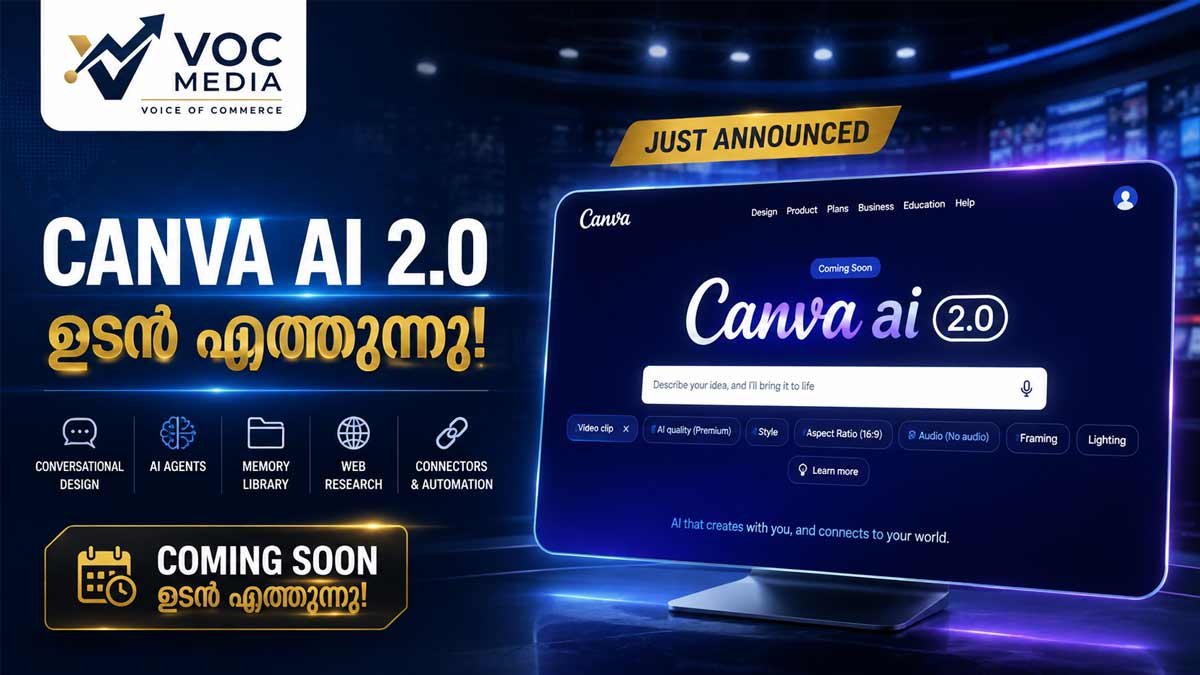
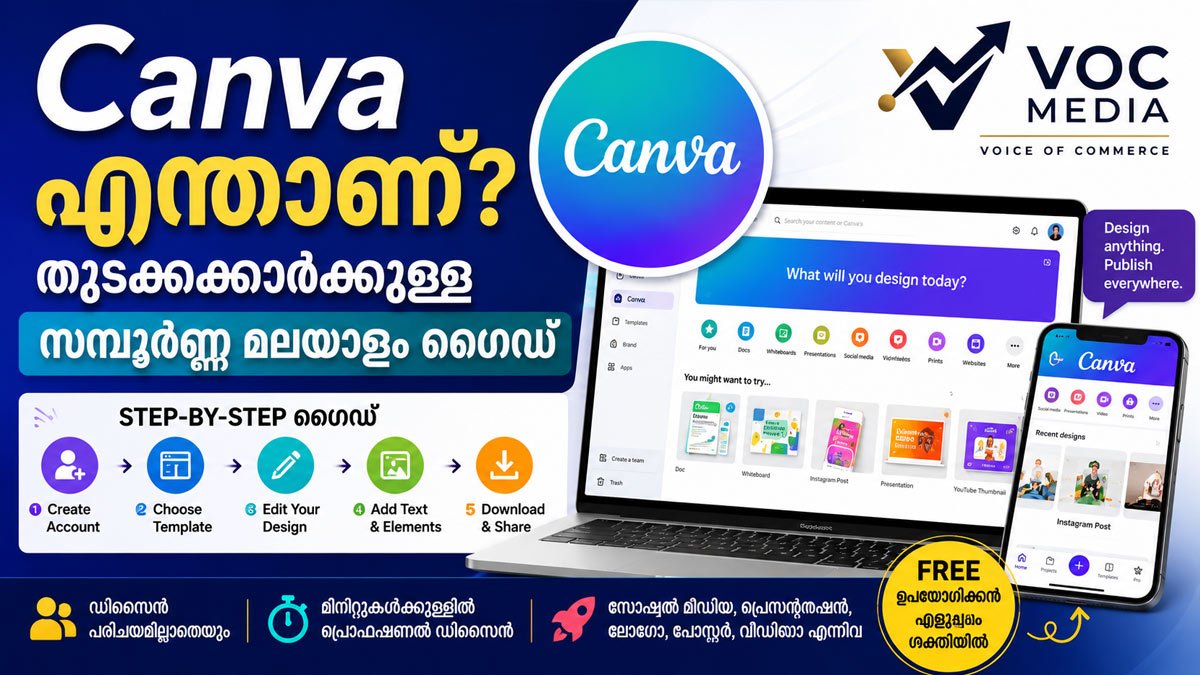
Canva AI 2.0, ഒരു prompt നൽകി design ഉണ്ടാക്കുന്നതിൽ നിന്ന് conversation വഴി idea വികസിപ്പിച്ച് editable design, research, brand application, content creation എന്നിവയിലേക്ക് നീങ്ങുന്ന Canvaയുടെ പുതിയ AI സംവിധാനം ആണ്. 2026-ൽ അവതരിപ്പിച്ച AI 2.0-യുടെ capabilities ഘട്ടംഘട്ടമായി rollout ചെയ്യുകയാണ് Canva.
Quick Facts
| വിഷയം | വിശദാംശം |
|---|---|
| Product | Canva AI 2.0 |
| Company | Canva |
| Presented at | Canva Create 2026 |
| Core idea | Conversational + Agentic AI design |
| Key capabilities | Conversational Design, Agentic Orchestration, Memory Library |
| New workflows | Connectors, Scheduling, Web Research, Brand Intelligence, Sheets AI, Canva Code 2.0 |
| Output | Layered, editable designs |
| Current status | Rollout / availability varies by plan and feature |
| Free users | Mainly Canva AI 1.0 and selected AI features |
| Paid plans | AI 2.0 features including Memory Library and Connectors |
| Editorial status | Verified from Canva official sources |
Canva ഇതുവരെ പ്രധാനമായും design ചെയ്യാനുള്ള platform എന്ന നിലയിലാണ് അറിയപ്പെട്ടിരുന്നത്.
എന്നാൽ generative AIയുടെ വളർച്ചയോടെ design workflow തന്നെ മാറുകയാണ്.
ഒരു blank page തുറന്ന് template തിരഞ്ഞെടുക്കുന്നതിന് പകരം,
“എനിക്ക് ഈ idea ഉപയോഗിച്ച് ഒരു campaign ഉണ്ടാക്കണം”
എന്ന് പറഞ്ഞാൽ AI തന്നെ design process-ൽ പങ്കാളിയാകുന്ന രീതിയിലേക്കാണ് Canva നീങ്ങുന്നത്.
ഇതിന്റെ ഏറ്റവും ശ്രദ്ധേയമായ ഉദാഹരണമാണ് Canva AI 2.0.
2026-ലെ Canva Create-ൽ അവതരിപ്പിച്ച AI 2.0-നെ Canva ഒരു conversational, agentic creative platform ആയി അവതരിപ്പിക്കുന്നു. ഒരു prompt-ൽ static output നൽകുന്നതിന് പകരം idea മുതൽ final editable work വരെ AI-യെ creative process-ന്റെ ഭാഗമാക്കുകയാണ് ലക്ഷ്യം.
Canva AI 2.0 എന്താണ്?
Canva AI 2.0 എന്നത് Canvaയുടെ Visual Suite-നുള്ളിൽ പ്രവർത്തിക്കുന്ന conversational AI system ആണ്.
അടിസ്ഥാന workflow:
Idea
↓
Conversation
↓
AI creates
↓
Edit & refine
↓
Brand application
↓
Final design
അതായത്,
നിങ്ങൾ idea പറയുക → Canva AI design ഉണ്ടാക്കുക → നിങ്ങൾ മാറ്റങ്ങൾ പറയുക → AI അത് refine ചെയ്യുക.
Canvaയുടെ official description അനുസരിച്ച് generated designs individual layered objects ആയി തുടരുന്നു. അതിനാൽ output ഒരു flat image ആയി മാത്രം lock ചെയ്യപ്പെടുന്നില്ല.
Canva AI 2.0-യിൽ എന്താണ് പ്രധാന മാറ്റം?
1. Conversational Design
Canva AI 2.0-ൽ design process conversation അടിസ്ഥാനമാക്കിയാണ്.
ഉദാഹരണത്തിന്:
“ഒരു technology news brand-നായി professional Instagram carousel ഉണ്ടാക്കുക.”
ആദ്യ design ലഭിച്ച ശേഷം:
“Headline കൂടുതൽ bold ആക്കൂ.”
“Newsroom style ആക്കൂ.”
“Blue and white brand identity ഉപയോഗിക്കൂ.”
“ഇത് LinkedIn format-ലും തയ്യാറാക്കൂ.”
എന്നിങ്ങനെ തുടർച്ചയായി Refine ചെയ്യാം.
Canva പറയുന്നതനുസരിച്ച് AI conversation-ന്റെ context നിലനിർത്തിക്കൊണ്ട് design process-ൽ തുടർന്നും പ്രവർത്തിക്കാൻ കഴിയും.
2. Agentic Orchestration
ഇതാണ് Canva AI 2.0-യിലെ വലിയ conceptual shift.
Agentic AI എന്നത് ഒരു single task ചെയ്യുന്നതിൽ മാത്രം നിൽക്കാതെ, ഒരു goal പൂർത്തിയാക്കാൻ ആവശ്യമായ പല ഘട്ടങ്ങളും coordinate ചെയ്യുന്ന AI സമീപനമാണ്.
ഉദാഹരണം:
“ഒരു product launch campaign തയ്യാറാക്കുക.”
AIക്ക്:
- Campaign Concept
- Presentation
- Social Content
- Visual Design
- Bbrand Application
തുടങ്ങിയ പല creative tasks coordinate ചെയ്യാൻ കഴിയുന്ന രീതിയിലാണ് Canva ഇത് അവതരിപ്പിക്കുന്നത്.
3. Layered & Editable Output
AI-generated design ഒരു single flattened image മാത്രമല്ല എന്നതാണ് മറ്റൊരു പ്രധാന feature.
Canvaയുടെ official announcement പ്രകാരം AI individual editable objects ഉപയോഗിച്ചാണ് design നിർമ്മിക്കുന്നത്.
അതിനാൽ:
- image മാറ്റാം
- headline മാറ്റാം
- font മാറ്റാം
- layout refine ചെയ്യാം
- individual elements edit ചെയ്യാം
എന്നിവ സാധ്യമാണ്.
Simple difference
Traditional AI generation:
Prompt → Image
Canva AI 2.0 vision:
Prompt → Editable Design
ഇതാണ് Canvaയുടെ പ്രധാന differentiator-കളിൽ ഒന്ന്.
4. Memory Library
Canva AI 2.0-ൽ Memory Library എന്ന ആശയവും അവതരിപ്പിച്ചിട്ടുണ്ട്.
ഇതിലൂടെ user-ന്റെ working style, preferences, projects, brand context എന്നിവ AI കൂടുതൽ മനസ്സിലാക്കുന്ന രീതിയിലാണ് system രൂപകൽപ്പന ചെയ്തിരിക്കുന്നത്.
അതിനാൽ ഓരോ പുതിയ design-നും brand style വീണ്ടും വിശദീകരിക്കേണ്ട ആവശ്യം കുറയ്ക്കുകയാണ് ലക്ഷ്യം
5. Connectors
Canva AI 2.0 പുറത്തുള്ള productivity tools കളുമായും ബന്ധിപ്പിക്കാനുള്ള workflows അവതരിപ്പിക്കുന്നു.
Canva official announcement-ൽ:
- Slack
- Gmail
- Google Drive
- Google Calendar
- Notion
- Zoom
- HubSpot
- Microsoft
- Atlassian
- Linear
തുടങ്ങിയ services പരാമർശിക്കുന്നു.
ഉദാഹരണം:
Zoom meeting transcript → Meeting summary → Canva document
അല്ലെങ്കിൽ:
Customer email → Sales information → Presentation
എന്ന workflow Canva ലക്ഷ്യമിടുന്നു.
6. Web Research
Canva AI 2.0-ൽ web research workflow കൂടി ഉൾപ്പെടുത്തിയിട്ടുണ്ട്.
അതായത് information ശേഖരിക്കുന്നതും അതിനെ creative output-ലേക്ക് കൊണ്ടുവരുന്നതും ഒരേ workflow-ന്റെ ഭാഗമാക്കുകയാണ് ലക്ഷ്യം.
ഒരു business proposal അല്ലെങ്കിൽ market research presentation തയ്യാറാക്കുമ്പോൾ research → structure → design എന്ന workflow കൂടുതൽ integrated ആക്കാനാണ് ഇത് സഹായിക്കുന്നത്.
7. Brand Intelligence
ഒരു business-ന്റെ:
- colours
- fonts
- visual identity
- brand style
എന്നിവ AI-generated designs-ൽ consistent ആയി ഉപയോഗിക്കുകയാണ് Brand Intelligence ലക്ഷ്യമിടുന്നത്.
അതിനാൽ ഓരോ design-നും manual brand formatting ചെയ്യേണ്ട സമയം കുറയ്ക്കാനാകും.
8. Canva Code 2.0
Canva AI 2.0-യുടെ ഏറ്റവും interesting extensions-ൽ ഒന്നാണ് Canva Code 2.0.
ഇവിടെ:
Prompt → Interactive Experience
എന്ന രീതിയിലേക്ക് Canva നീങ്ങുന്നു.
ഉദാഹരണം:
“Create an interactive AI tools directory with search, categories and clickable cards.”
ഇത്തരത്തിലുള്ള conversational prompts ഉപയോഗിച്ച് responsive interactive experiences നിർമ്മിക്കാനാണ് Canva Code 2.0 രൂപകൽപ്പന ചെയ്തിരിക്കുന്നത്. HTML import capabilityയും Canva ഇതോടൊപ്പം പ്രഖ്യാപിച്ചിട്ടുണ്ട്.
9. Sheets AI
AI design മാത്രം അല്ല, structured data workflow-ലേക്കും Canva AI വ്യാപിപ്പിക്കുന്നു.
Canvaയുടെ announcement പ്രകാരം budget tracker, project timeline, content calendar തുടങ്ങിയ ആവശ്യങ്ങൾ prompt വഴി structured Canva Sheets ആയി സൃഷ്ടിക്കാൻ Sheets AI സഹായിക്കും.
10. Scheduling
Canva AI 2.0-ൽ repetitive creative tasks automate ചെയ്യാനുള്ള Scheduling workflowയും അവതരിപ്പിച്ചിട്ടുണ്ട്.
ഉദാഹരണം:
Every Friday → Social media content batch
അല്ലെങ്കിൽ
Every morning → Email information → Briefing document
എന്ന രീതിയിലുള്ള workflows Canva ലക്ഷ്യമിടുന്നു.
Beginner Tutorial: Canva AI 2.0 എങ്ങനെ ഉപയോഗിക്കാം?
ഒരു practical example നോക്കാം.
Step 1
Canva തുറന്ന് Canva AI തിരഞ്ഞെടുക്കുക.
Step 2
ഒരു simple prompt നൽകുക:
“Create a professional technology news Instagram carousel about the future of AI. Use a clean premium newsroom style.”
Step 3
AI-generated design പരിശോധിക്കുക.
Step 4
അടുത്ത prompt നൽകുക:
“Make the headline stronger and simplify the layout.”
Step 5
അടുത്തതായി:
“Apply a consistent professional brand identity.”
Step 6
അവസാനം:
“Create a LinkedIn version from the same content.”
ഇവിടെ പ്രധാന lesson:
ഒരു വലിയ prompt മാത്രം നൽകുന്നതിനെക്കാൾ Conversation വഴി Refine ചെയ്യുക.
Canvaയുടെ own guidance-ലും specific prompts, smaller steps, follow-up conversation എന്നിവ ഉപയോഗിച്ച് results മെച്ചപ്പെടുത്താമെന്ന് വ്യക്തമാക്കുന്നു
Canva AI 2.0 ഉപയോഗിച്ച് എന്തൊക്കെ ചെയ്യാം?
Content Creators
- Instagram posts
- Carousels
- YouTube visuals
- Presentations
- Campaign creatives
- Content calendars
Marketing Teams
- Campaign concepts
- Brand creatives
- Ad variations
- Presentations
- Research-based content
Sales Teams
- Sales presentations
- Proposals
- Customer communication
- Pitch materials
Businesses
- Reports
- Meeting summaries
- Internal documents
- Marketing materials
- Brand communication
Students
- Presentations
- Visual learning materials
- Project designs
- Research summaries
- Interactive projects
Canva AI 2.0-ന്റെ ഏറ്റവും വലിയ മാറ്റം എന്താണ്?
Canvaയുടെ evolution ഏകദേശം ഇങ്ങനെ കാണാം:
Templates
↓
Design Tools
↓
AI-Assisted Design
↓
Generative AI
↓
Conversational + Agentic Creative Workflow
ഇതാണ് Canva AI 2.0-നെ ശ്രദ്ധേയമാക്കുന്നത്.
AI ഒരു Tool ആയി മാത്രം പ്രവർത്തിക്കുന്നതിൽ നിന്ന് ഒരു creative partner ആയി പ്രവർത്തിക്കുന്ന model-ലേക്ക് Canva നീങ്ങുകയാണ്.
VOC Analysis
Canva AI 2.0-ന്റെ പ്രധാന story AI-generated images അല്ല.
അത് Canvaയിൽ ഇതിനകം ഉണ്ടായിരുന്ന AI direction-ന്റെ തുടർച്ചയാണ്.
പുതിയ മാറ്റം:
Idea → Research → Creation → Editing → Brand → Interactive Experience → Workflow
എന്ന complete creative journey-യിലേക്ക് AI എത്തിക്കാനുള്ള ശ്രമമാണ്.
ഇത് വിജയിച്ചാൽ Canva ഒരു traditional design application എന്നതിൽ നിന്ന് കൂടുതൽ AI-powered creative operating platform എന്ന നിലയിലേക്ക് മാറാൻ കഴിയും.
അതുകൊണ്ട് Canva AI 2.0-നെ വിലയിരുത്തുമ്പോൾ ചോദിക്കേണ്ട പ്രധാന ചോദ്യം:
“AI എത്ര മനോഹരമായ design ഉണ്ടാക്കും?”
എന്നതല്ല.
പകരം:
“ഒരു idea-യിൽ നിന്ന് finished work വരെ AI എത്രത്തോളം workflow കൈകാര്യം ചെയ്യും?”
എന്നതാണ്.
Limitations
Canva AI 2.0 ശ്രദ്ധേയമായ development ആണെങ്കിലും ചില കാര്യങ്ങൾ ശ്രദ്ധിക്കണം.
- എല്ലാ features എല്ലാ plans-ലും ലഭ്യമല്ല.
- Free/Education usersക്ക് access പരിമിതമാണ്.
- Feature availability account/plan/rollout അനുസരിച്ച് മാറാം.
- AI-generated content human review ഇല്ലാതെ publish ചെയ്യുന്നത് ഒഴിവാക്കണം.
- Brand-sensitive അല്ലെങ്കിൽ confidential information ഉപയോഗിക്കുമ്പോൾ Organisation policy പരിശോധിക്കണം.
എന്ന് Canvaയുടെ current Help Centre paid-plan eligibility വ്യക്തമാക്കുന്നു.
Who Should Use Canva AI 2.0?
ഏറ്റവും കൂടുതൽ പ്രയോജനം ലഭിക്കാൻ സാധ്യതയുള്ളവർ:
- Content creators
- Marketing teams
- Social media managers
- Small businesses
- Startup teams
- Students
- Designers
- Presentation creators
- Non-designers
പ്രത്യേകിച്ച് “എനിക്ക് Design ചെയ്യണം” എന്നതിലുപരി “എനിക്ക് ഒരു Creative Task പൂർത്തിയാക്കണം” എന്ന സമീപനമുള്ളവർക്ക് AI 2.0 കൂടുതൽ Interesting ആയിരിക്കും.
FAQ
1. Canva AI 2.0 എന്താണ്?
Canva Visual Suite-നുള്ളിൽ conversational AI ഉപയോഗിച്ച് idea മുതൽ editable design വരെ സൃഷ്ടിക്കാനും refine ചെയ്യാനും സഹായിക്കുന്ന Canvaയുടെ പുതിയ AI സംവിധാനം ആണ്.
2. Canva AI 2.0 launch ചെയ്തോ?
അതെ. Canva 2026 Canva Create-ൽ AI 2.0 ഔദ്യോഗികമായി അവതരിപ്പിച്ചു. ആദ്യം research preview ആയി അവതരിപ്പിച്ച ശേഷം availability ഘട്ടംഘട്ടമായി rollout ചെയ്യുകയായിരുന്നു.
3. Canva AI 2.0 എല്ലാവർക്കും ലഭ്യമാണോ?
അല്ല. Canvaയുടെ current Help Centre പ്രകാരം പ്രധാന AI 2.0 features Pro, Teams, Business, Non-profit plans-ൽ ലഭ്യമാണ്. Free/Education usersക്ക് പരിമിതമായ AI access ആണ്.
4. Canva AI 2.0-ന്റെ പ്രധാന features എന്തൊക്കെയാണ്?
Conversational Design, Agentic Orchestration, Layered Object Intelligence, Memory Library, Connectors, Scheduling, Web Research, Brand Intelligence, Sheets AI, Canva Code 2.0 എന്നിവയാണ് പ്രധാന capabilities.
5. Canva AI 2.0 static image മാത്രമാണോ ഉണ്ടാക്കുന്നത്?
അല്ല. Canvaയുടെ announcement പ്രകാരം AI-generated designs layered, editable objects ഉപയോഗിച്ചാണ് നിർമ്മിക്കുന്നത്.
6. Canva AI 2.0 ഉപയോഗിച്ച് video ഉണ്ടാക്കാമോ?
Canva AI platform-ൽ images, videos, designs എന്നിവ സൃഷ്ടിക്കാനും edit ചെയ്യാനും AI capabilities ഉണ്ട്. എന്നാൽ AI 2.0-ന്റെ പ്രധാന news story video generation മാത്രമല്ല; complete conversational creative workflow ആണ്.
7. Canva AI 2.0-ൽ web research ഉണ്ടോ?
ഉണ്ട്. Canva AI 2.0-ൽ web research workflow Canva പ്രഖ്യാപിച്ചിട്ടുണ്ട്.
8. Canva Code 2.0 എന്താണ്?
Prompt ഉപയോഗിച്ച് responsive interactive experiences നിർമ്മിക്കാനും HTML import ചെയ്യാനും സഹായിക്കുന്ന Canvaയുടെ AI-powered creation capability ആണ് Canva Code 2.0.
9. Canva AI 2.0 free ആണോ?
Canvaയുടെ current Help Centre പ്രകാരം full AI 2.0 access paid plans-ഉ മായി ബന്ധപ്പെട്ടതാണ്. Free/Education usersക്ക് ചില AI features മാത്രമാണ് ലഭിക്കുന്നത്.
10. Canva AI 2.0-ന്റെ next update എപ്പോഴാണ്?
എല്ലാ upcoming capabilities-നും ഒരൊറ്റ fixed public launch date Canva പ്രഖ്യാപിച്ചിട്ടില്ല. Availability ഘട്ടംഘട്ടമായി മാറുന്നതിനാൽ official Canva announcements ആണ് follow ചെയ്യേണ്ടത്.
Author: Ummer Moahammed
Sources
Primary Source — Canva Newsroom:
Canva AI 2.0 official introduction, core architecture, intelligent workflows, research preview and rollout details.
Current Availability — Canva Help Centre:
AI 2.0 feature availability, plan eligibility and current access information.
Canva Newsroom:
Current Canva product/news updates and AI-related announcements.
VOC Verified™
Status: VERIFIED
Primary Source: Canva Official Newsroom
Availability: Plan/feature dependent
Launch Status: Introduced; rollout/availability varies by capability
Last Checked: 23 August 2026